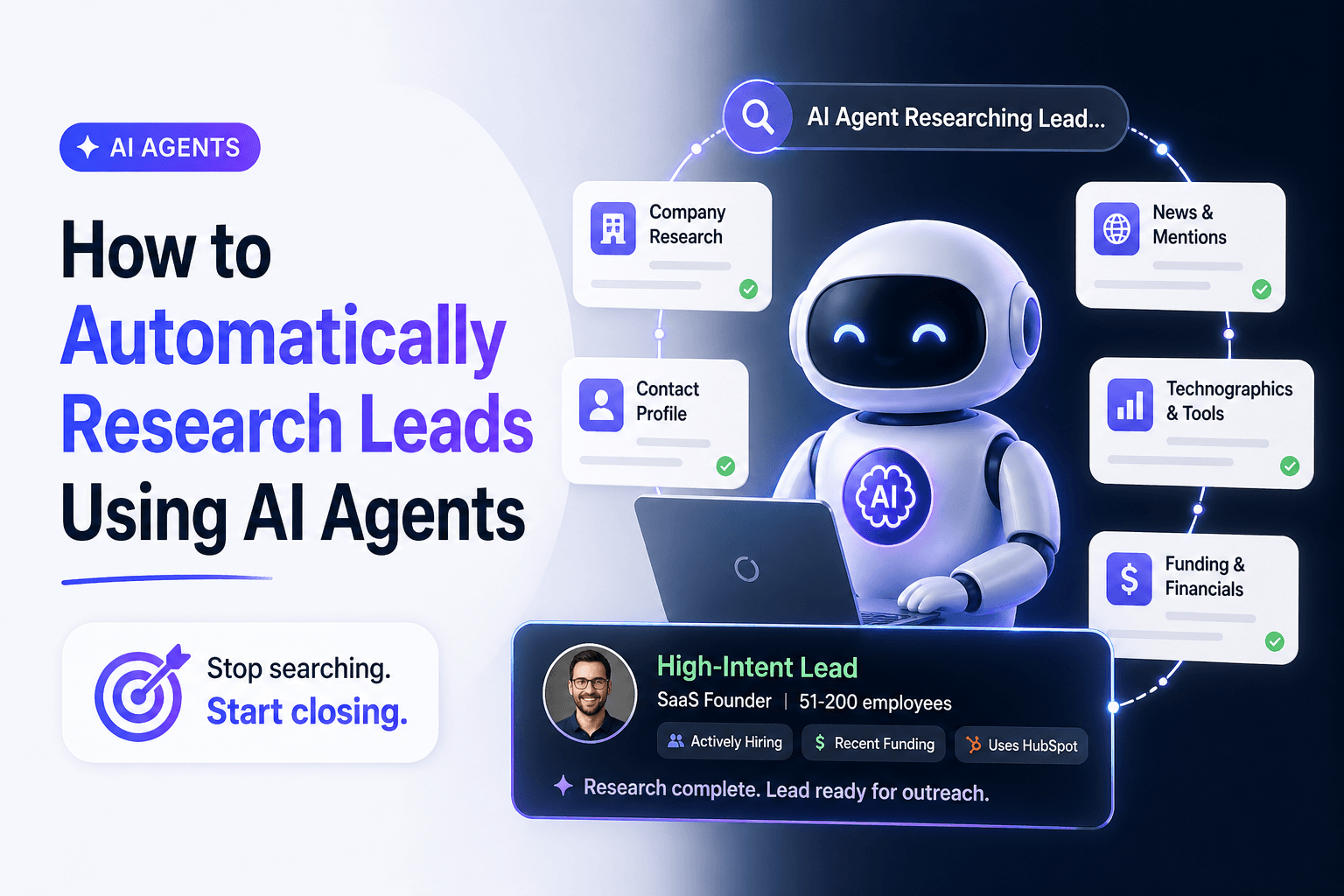
How to Automatically Research Leads Using AI Agents
Most teams still do lead research the hard way.
A rep opens a company website, scans LinkedIn, checks the CRM, copies notes into a field, and then does it all again for the next prospect. It works, but only up to a point. Once lead volume picks up, manual research starts to slow everything down. Records get messy. Follow-up loses momentum. Good opportunities sit too long without context.
That is why more revenue teams want to automatically research leads using AI agents.
Used well, AI agents can pull together company context, surface buying signals, summarize what matters, and push the results into the systems your team already uses. The point is not to remove human judgment. It is to stop wasting skilled time on repetitive digging.
In this guide, you will learn what AI lead research actually looks like, where it helps most, how to build a workflow that your team will trust, and where people still need to stay involved.
Why manual lead research breaks down
Lead research sounds simple until you have to do it at scale.
Sales reps need enough context to write a smart first message. Marketing wants consistent qualification. RevOps wants clean data. Leadership wants speed without sacrificing quality. Manual research rarely gives you all four.
Here is where the process usually slips:
- Reps spend too much time hunting for basic company information
- Notes live across browser tabs, spreadsheets, and CRM fields
- Different people qualify leads in different ways
- Prospect data goes stale fast
- Follow-up gets delayed because nobody has a clear picture of the account
The cost is not just time. It is missed timing, weak personalization, and inconsistent handoffs between teams.
When you automate lead research, you replace ad hoc digging with a repeatable system. Every new lead goes through the same steps. Every record gets structured context. Every rep starts from something stronger than a blank screen.
What AI agents actually do in lead research
An AI agent is more than a chatbot answering questions in a box.
In a lead research workflow, an agent can follow instructions, work through a sequence of tasks, use connected tools, and return structured output. That makes it useful for the kind of operational work that usually eats up a rep's day. For a broader picture of how agents fit into day-to-day operations, see AI agents for business automation in 2026.
A lead research agent can:
- review a company website and public pages
- summarize what the business does in plain language
- identify likely industry, size, or use case
- flag signals that suggest urgency or fit
- enrich lead records with structured fields
- score or route leads based on your rules
A simple example looks like this:
- A new form submission arrives.
- The workflow pulls in the company name and domain.
- An agent reviews public information about the business.
- The workflow matches the account against your ideal customer profile.
- The result is saved to your CRM or a structured table.
- A rep gets a short brief with the next recommended action.
Where teams get the biggest payoff
The biggest benefit is not novelty. It is consistency.
When lead research is automated well, teams see gains in a few practical areas.
Faster first-pass qualification
AI agents can process inbound leads quickly, which means reps are not spending their morning gathering facts that could have been collected automatically. High-fit leads rise to the top faster, and weak-fit leads are easier to filter out early.
Better personalization
A generic outreach message is usually a context problem. If a rep already knows what the company sells, who it serves, and where the likely pain points are, the first touch gets sharper. AI agents help by assembling that context before a human ever starts writing.
Cleaner CRM records
Most CRM clutter comes from partial notes and uneven data entry. Structured outputs help solve that. Instead of dumping a paragraph into a record, your workflow can store clear fields like industry, company size, use case, fit score, and confidence level.
Smoother handoffs between teams
Marketing, SDRs, account executives, and RevOps all work better when they are looking at the same lead picture. Automated research creates a shared record instead of forcing each team to rebuild context from scratch.
More time for human work
This is the real win. Reps should spend their best energy on conversations, discovery, positioning, and relationship-building. They should not burn an hour collecting information that software can gather in minutes. Much of that manual digging is the same class of repetitive work we cover in 12 time-consuming tasks AI can eliminate from your workday.
How to build an AI lead research workflow that actually works
A good workflow does not need to be complicated. It needs to be clear.
1. Define what a good lead looks like
Before you automate anything, document your ideal customer profile.
Keep it practical:
- target industries
- company size range
- geography
- job titles
- common pain points
- disqualifiers
- signals that suggest urgency
If your definition of a qualified lead changes depending on who you ask, your automation will only scale that confusion.
2. Choose your input sources
Next, decide where leads enter the process. Common sources include:
- website forms
- webinar registrations
- outbound account lists
- CRM imports
- partner referrals
- event follow-up lists
The goal is simple. No matter where the lead comes from, it should go through the same research and qualification flow.
3. Standardize the output
This step gets overlooked all the time.
If your workflow returns a loose block of text, it is harder to sort, route, report on, and trust. Instead, define a simple schema.
For example:
- company name
- website
- industry
- estimated company size
- likely use case
- key pain points
- fit score
- confidence level
- recommended follow-up
Structured output is what turns a helpful summary into something your team can operate on.
4. Add enrichment and scoring carefully
This is where people often overbuild.
Start with the most useful signals first. You do not need fifteen scoring factors on day one. Pick the few that matter most to your sales process, test them on real leads, and refine from there.
If you are using a platform like AffinityBots, the sweet spot is usually a workflow that gathers context, checks fit, stores the result, and triggers the next step automatically. That could mean routing a strong lead to sales, sending a lower-fit lead into a nurture path, or flagging uncertain records for review. Once qualification is in place, the next layer is often follow-up automation; see how to automate lead follow-up for a practical walkthrough.
5. Keep a human in the loop
AI is excellent at first-pass analysis. It is not your final decision-maker.
Human review still matters for:
- strategic accounts
- large deal sizes
- low-confidence outputs
- regulated industries
- outbound campaigns where messaging precision matters
Think of AI as your first analyst, not your closer.
Best use cases for B2B teams
The strongest use cases tend to be the least flashy. They solve real operational friction.
Inbound lead qualification
A prospect fills out a demo form. Instead of sending that lead straight into a queue with almost no context, an AI workflow reviews the company, summarizes what it does, checks fit against your ICP, and gives the assigned rep a short brief before outreach starts.
Outbound account research
An SDR team uploads a target list. The workflow enriches company details, identifies likely angles, and gives each rep a cleaner starting point before they begin prospecting.
Webinar and event follow-up
After an event, marketing often has a long list of names and little time. AI agents can group accounts by industry, summarize likely needs, and help teams prioritize who should get immediate follow-up.
CRM cleanup and re-qualification
A lot of companies sit on stale lead records. An automated workflow can revisit those accounts, re-check public information, and update old entries so your team is not working from outdated assumptions.
Industry coverage from G2 and Marketing AI Institute reflects the same broader trend: teams are not just looking for more leads. They want better context, faster qualification, and less manual work between systems.
Common mistakes to avoid
AI lead research can save a lot of time, but it is easy to misuse.
Automating before your process is clear
If your qualification logic is fuzzy, automation will not fix it. It will simply make the mess happen faster.
Trusting low-confidence outputs too quickly
Some companies have weak websites, vague messaging, or limited public information. In those cases, the right answer is not blind confidence. It is a flag for review.
Storing everything as unstructured notes
Freeform summaries are helpful for humans, but operations need fields. If you want routing, reporting, and lifecycle automation to work, you need consistent structure.
Ignoring privacy and compliance
If your workflow handles personal data or enrichment, make sure your process aligns with your legal and privacy requirements. This is especially important in regulated industries and international markets.
Best practices that make the workflow stick
If you want your team to trust the output, keep these principles in place:
- start with one segment before expanding
- use a small number of qualification rules at first
- write prompts around real sales questions, not generic summaries
- review weak-confidence results manually
- track downstream outcomes, not just speed
- revisit the workflow regularly as your ICP evolves
- combine AI research with rep judgment, not instead of it
Simple, reliable systems usually outperform complex ones that nobody fully understands.
Frequently asked questions
Can AI agents replace human lead researchers?
No. They are best at speeding up research, summarizing public information, and organizing lead context. Human judgment still matters for messaging, prioritization, and deal strategy.
How accurate is AI-powered lead research?
It depends on your source data, workflow design, and review process. The better your inputs and qualification criteria, the more useful the output becomes.
What is the biggest advantage of automating lead research?
You get speed and consistency at the same time. Reps spend less time collecting information and more time acting on it.
Which teams benefit most from AI lead research?
B2B sales, marketing, RevOps, and founder-led growth teams usually see the fastest return because they deal with lead volume, handoff issues, and messy qualification work every day.
Do you need a developer to set this up?
Not always. Many teams use no-code or low-code systems to build these workflows. If your process is more complex, technical support may help, but it is not always required to get started.
Final takeaway
If you want to automatically research leads using AI agents, start small and build for usefulness.
Define your ideal customer profile. Decide what data actually matters. Standardize the output. Then automate the repetitive parts and leave the higher-judgment decisions to your team.
That is the real value here. Less tab-switching. Less copy-pasting. Better context. Faster follow-up. More time for the conversations that move deals forward.