What Is WebMCP? Making Your Website Agent-Ready for AI
If you have started hearing about WebMCP, you are probably wondering the same thing most business owners are: is this another acronym that will fade, or is it something I should actually prepare for? The short answer is that WebMCP solves a very specific, very real problem, and it is arriving at exactly the moment AI agents are starting to browse the web on behalf of real customers.
This guide explains what WebMCP is in plain English, how it works under the hood, and what it means for your website. If you would rather skip straight to implementation, our WebMCP Integration service covers how we make sites agent-ready.
The problem WebMCP solves
Right now, when an AI agent "uses" your website, it does something surprisingly crude. It takes a screenshot, tries to figure out what is on the screen, guesses where to click, simulates a click, takes another screenshot, and repeats. This is called screen scraping or DOM automation, and it has three big problems:
- It is brittle. Change a button, rename a label, or ship a redesign, and the agent breaks.
- It is slow and expensive. Every step burns tokens reasoning over images of your page.
- It is opaque. The agent is guessing at your intent instead of using your actual business logic.
The alternative that some companies reach for is building a separate backend API just for agents. But that bypasses your website entirely, splitting your logic in two and losing the shared context between what the human sees and what the agent does.
WebMCP takes a different path. Instead of agents scraping your UI, your website tells the agent exactly what it can do.
What WebMCP actually is
WebMCP, short for Web Model Context Protocol, is an emerging web standard being developed through the W3C Web Machine Learning Community Group, with proposals contributed by engineers at Google and Microsoft. It builds on the same ideas as the Model Context Protocol (MCP) that has become popular for connecting AI models to tools, but brings it directly into the browser.
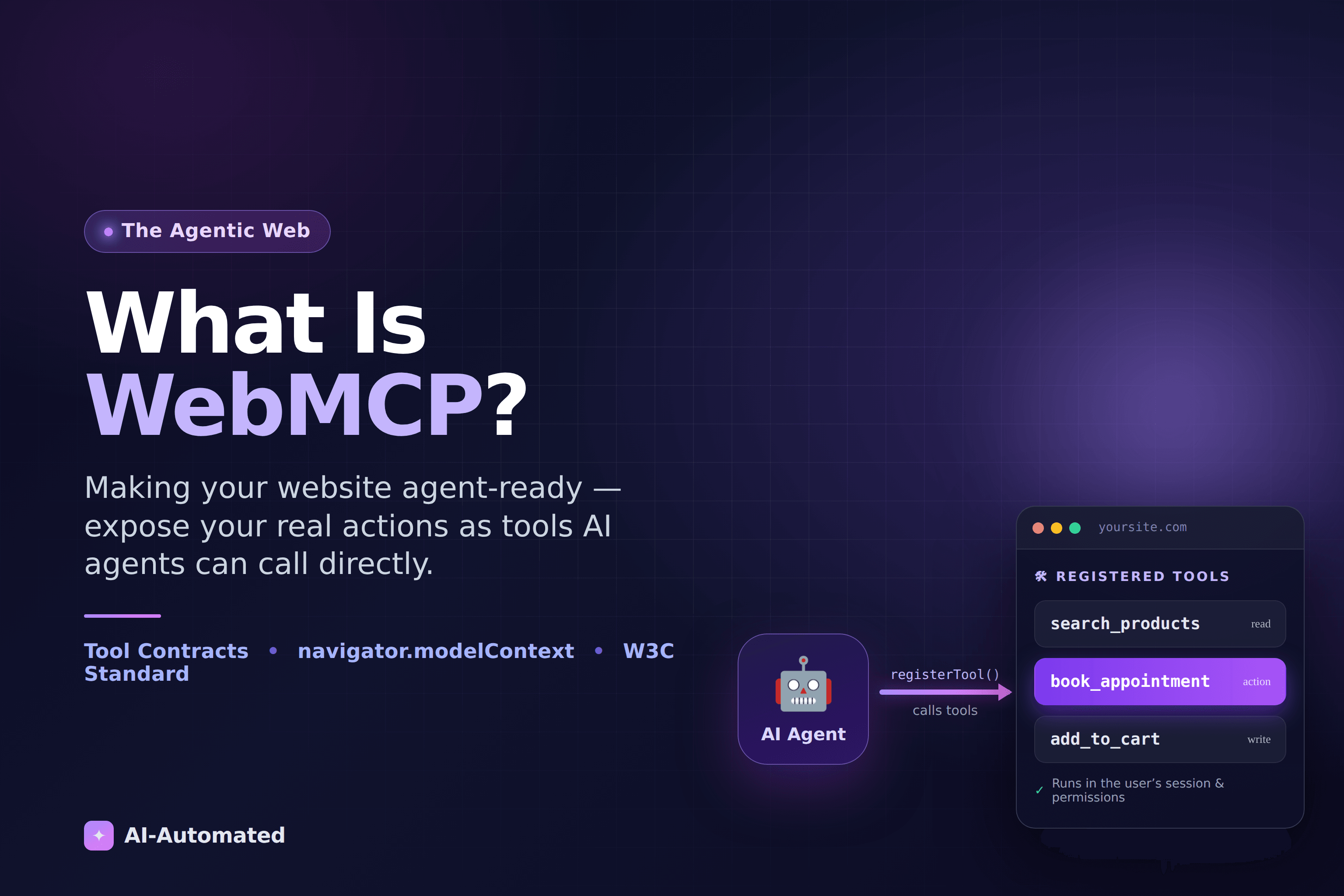
The core idea is simple: your website publishes a tool contract (a structured list of actions it can perform), and AI agents read that list and call those actions directly.
Think of it like a restaurant. Screen scraping is an agent wandering into the kitchen and trying to cook by watching the chefs. WebMCP is handing the agent a menu. The menu lists exactly what is available, what each dish needs from you, and the kitchen still does the cooking. Your site stays in control of how the work actually gets done.
How WebMCP works
WebMCP introduces a browser API, surfaced through navigator.modelContext in Chrome's early preview, that lets your site register tools. Each tool has four parts:
- A name: a short identifier like
book_appointment. - A description: plain language telling the agent what the tool does and when to use it.
- An input schema: a JSON Schema describing exactly what data the tool needs.
- An execute handler: the JavaScript that actually runs, using your real APIs and logic.
Here is what registering a tool looks like:
navigator.modelContext.registerTool({
  name: "book_appointment",
  description: "Book an available appointment slot for a service.",
  inputSchema: {
    type: "object",
    properties: {
      service: { type: "string" },
      date: { type: "string", description: "YYYY-MM-DD" },
    },
    required: ["service", "date"],
  },
  async execute({ service, date }) {
    const res = await fetch("/api/appointments", {
      method: "POST",
      body: JSON.stringify({ service, date }),
    });
    return { content: [{ type: "text", text: await res.text() }] };
  },
});
Once that tool is registered, an AI agent visiting your page can discover it, see that it needs a service and a date, and call it with structured data. There is no screenshot, no guessing, no simulated clicking. The agent asks for exactly what it wants, and your code (your real booking logic) handles it.
Because the tool runs inside the user's own browser session, it uses their login, their permissions, and your business rules. The agent cannot do anything a normal visitor could not do, and you decide what to expose.
A quick note on the moving target: WebMCP is a new and evolving standard. The exact method names and shapes are still being refined between the W3C spec and Chrome's implementation. The concept (registering named tools with typed inputs) is stable, but the precise syntax will keep shifting until it reaches a stable browser release. That is a big reason to work with someone tracking the spec rather than hardcoding against an early preview.
Why this matters for your business
The reason to care about WebMCP is not the technology itself. It is what it unlocks.
Reliable automation that survives redesigns
Because agents call named tools instead of hunting for buttons, you can redesign your site freely without breaking every AI integration. The contract stays stable even when the pixels move.
Dramatically lower cost and latency
Screenshot-based browsing is expensive because the model has to reason over images at every step. Structured tool calls skip that loop entirely. Early reporting on WebMCP points to very large efficiency gains over screenshot-driven agents: the difference between an agent that feels instant and one that stalls.
You keep control and context
Unlike a separate agent-only API, WebMCP keeps everything inside your website. The human and the agent share the same session and the same view, so a customer can watch an agent fill their cart and step in at any point. You decide which actions are exposed, and you can require confirmations for anything sensitive.
Discoverability in the agentic web
This is the strategic part. As more people delegate tasks to AI assistants ("book me a haircut Thursday," "reorder my usual," "find a contractor and get a quote"), the websites those agents can actually use are the ones that get chosen. Sites that only work through screen scraping will be slower, less reliable, and easier to skip. Being agent-ready is becoming a discoverability advantage, much like being mobile-friendly was a decade ago.
Where WebMCP is today
Here is the honest timeline. The underlying browser-native MCP work began in early 2025. Google and Microsoft published a unified proposal in mid-2025, and the W3C Community Group took it up shortly after. Chrome shipped an early preview of navigator.modelContext in early 2026, accessible behind a flag, with broader browser support expected to follow through the year.
In other words: it is real, it is shipping in preview, and it is early. That is precisely the window where getting ahead pays off. The businesses that map their key actions to tools now will be ready the moment agents start arriving in volume, and they will have learned what works while competitors are still reading the headlines.
How to get started
You do not need to rebuild your website to adopt WebMCP. The practical path looks like this:
- Map your high-value actions. What do customers actually come to your site to do? Search, book, buy, get support, request a quote. Those become your first tools.
- Design a clean tool contract. Clear names, honest descriptions, and strict input schemas so agents call things correctly.
- Wire tools to your real logic. Each tool's handler calls the same APIs your site already uses, so behavior stays consistent for humans and agents alike.
- Add guardrails. Permissions, confirmations for sensitive actions, and monitoring so you can see how agents are using your site.
If you are already investing in AI, WebMCP pairs naturally with the work in our guide to AI agents for business automation in 2026. Agents you build for internal workflows and the agent-ready front door you expose to the outside world are two sides of the same shift.
The bottom line
WebMCP is the web quietly rebuilding itself for a world where your visitors might be software. Instead of forcing agents to squint at your screens, it lets your site hand them a menu of exactly what it can do: reliably, cheaply, and on your terms. It is early, the standard is still settling, and that is exactly why now is the time to prepare.
If you want to make your website one of the first agents can actually use, take a look at our WebMCP Integration service or book a readiness call. We will map your highest-value tools and get you ahead of the agentic web.