The Complete Guide to Multi-Agent AI Systems for Small Business Operations
What if the real advantage of Multi-agent Systems is not that they sound more advanced, but that they finally match how small businesses actually work?
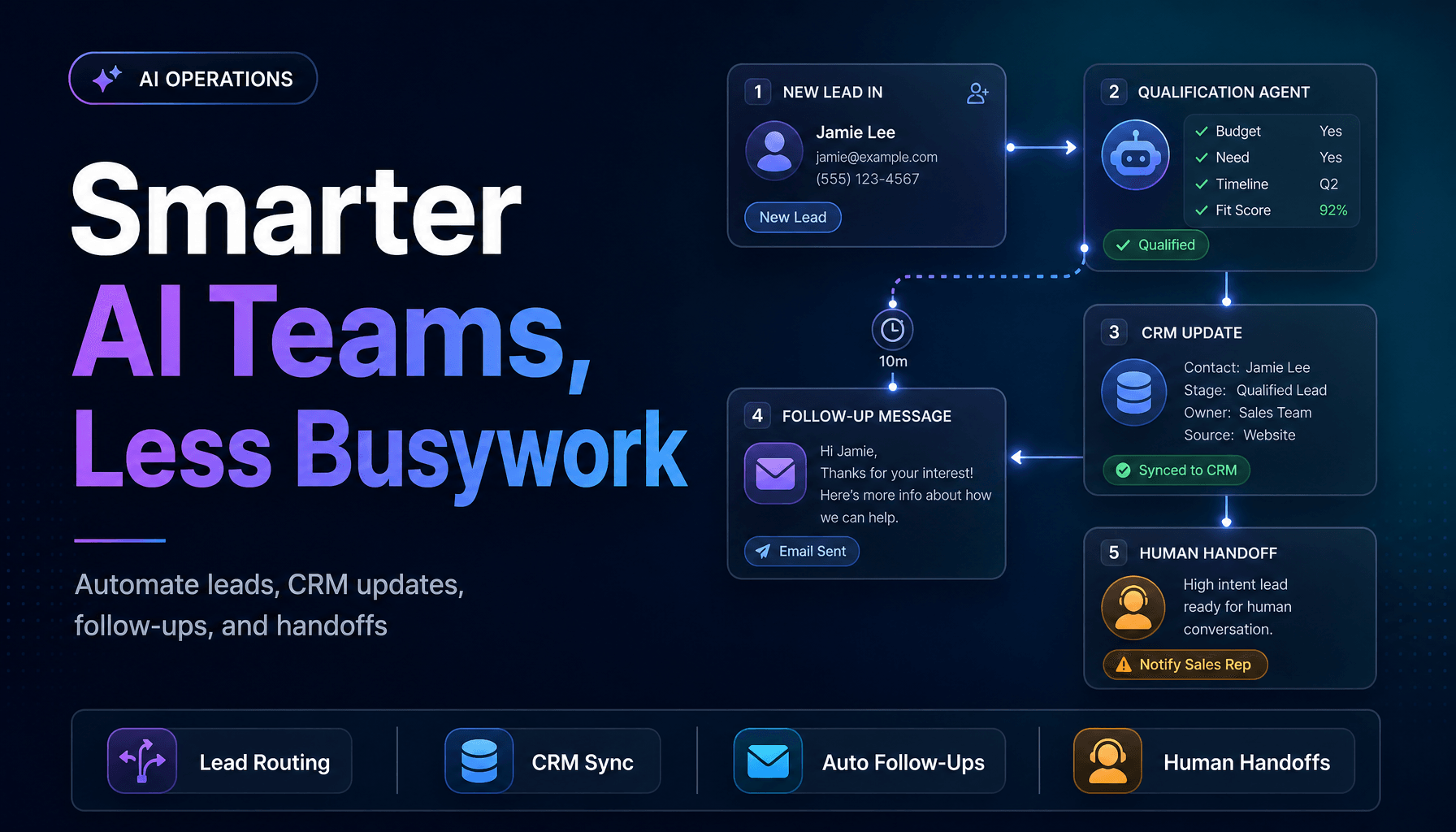
A single AI tool can answer questions. A well-built multi-agent system can take an inquiry, qualify the lead, update the CRM, trigger a follow-up, and hand the edge case to a human with context attached. That difference matters now. In McKinsey’s State of AI 2025, 23% of organizations said they were already scaling agentic AI in at least one function, and another 39% said they were experimenting with AI agents. At the same time, PwC’s May 2025 AI Agent Survey found that 66% of companies adopting AI agents reported measurable productivity gains.
For small business operators, that creates a practical question: when should you move from one assistant to a team of specialized agents?
One smart assistant is useful, but it breaks the moment work branches
Most small business processes are not linear. A new lead does not just need a reply. It may need enrichment, qualification, routing, scheduling, CRM logging, and a fallback path if the person does not respond.
That is where AI Agents start to outperform one-size-fits-all automation.
In practice, we have found that one general-purpose assistant usually fails in three predictable places:
- It loses track of workflow state.
- It mixes reasoning with system actions.
- It becomes hard to audit when something goes wrong.
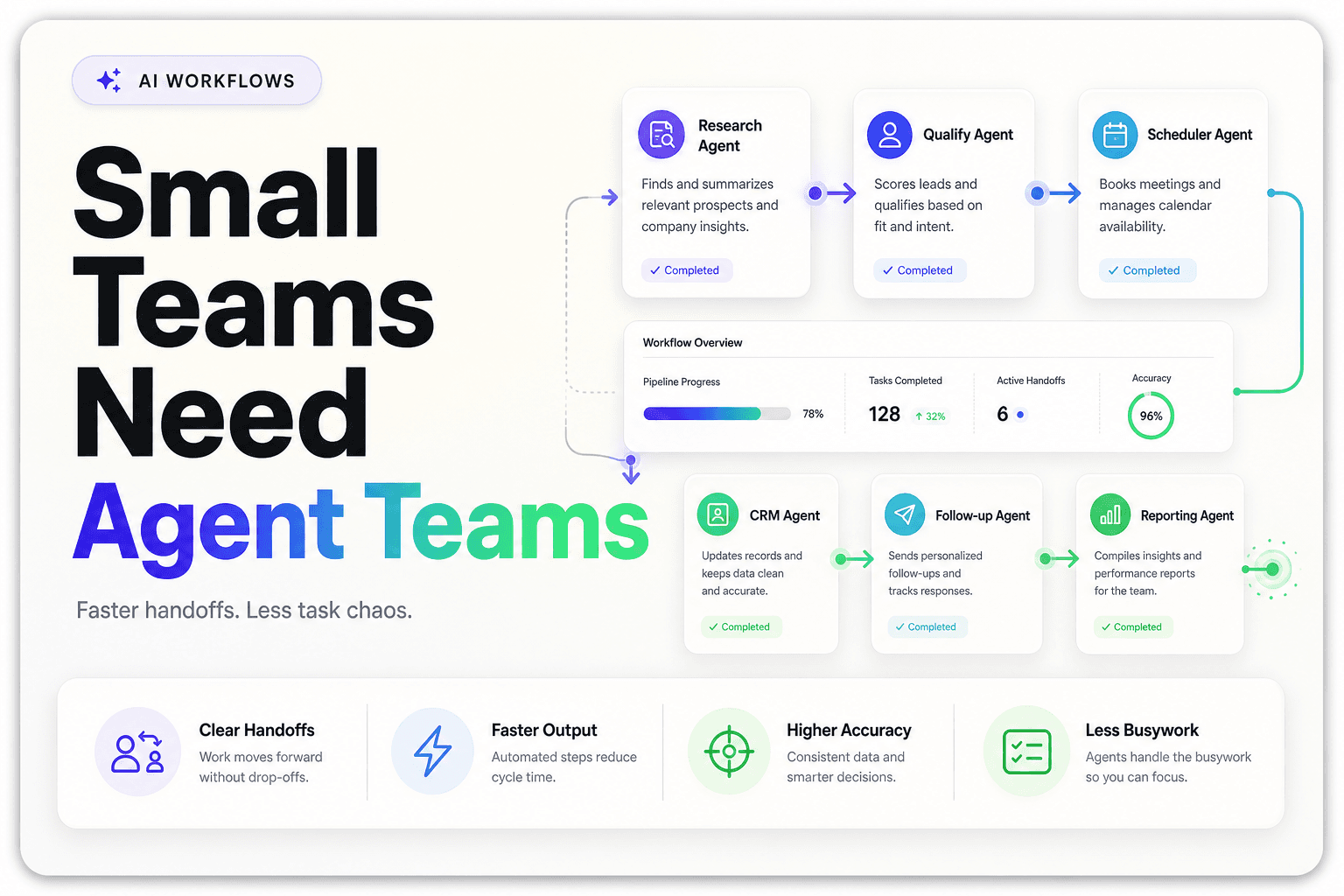
A multi-agent system solves that by splitting the work into roles. For example:
- an intake agent captures the request
- a research agent pulls business context
- a qualification agent scores fit
- an action agent updates the CRM or calendar
- a review agent checks confidence before handoff
This is not complexity for its own sake. It is how you keep Workflow Automation reliable once the process has more than one decision point.
If you want a simpler starting point, our guide to AI agents for business automation in 2026 breaks down the difference between agents that answer and agents that execute. If your use case is revenue-facing, how to build an AI lead intake system that routes, scores, and responds automatically shows what this looks like in an actual lead flow.
Do not start with “an AI team,” start with one messy operational choke point
The fastest way to waste money on multi-agent design is to begin with architecture diagrams instead of operational friction.
Small businesses usually get better results when they start with a process that already has all four of these traits:
- high volume
- repetitive decisions
- clear handoffs
- measurable outcomes
That often means:
- inbound lead qualification
- appointment routing and rescheduling
- customer inquiry triage
- CRM cleanup and record enrichment
- after-hours phone and message coverage
The reason is simple. These workflows already have a hidden labor cost. Every manual touch adds delay, and every delay creates leakage.
PwC’s AI Agent Survey found that 57% of companies using AI agents reported cost savings, while 54% reported improved customer experience. For a small team, that usually does not show up as “we replaced headcount.” It shows up as fewer dropped leads, less admin drag, and faster response times without hiring another coordinator or SDR.
A good rule is to avoid starting with the most strategic process in the company. Start where the work is structured enough to automate, but painful enough that everyone feels the gain.
That is also why Lead qualification is such a strong first use case. If your team is still manually triaging every form fill, spreadsheet import, and voicemail, the bottleneck is not lead volume. It is operational design. Related examples in 9 tools for automating lead qualification without adding SDR headcount and why speed to lead still wins in 2026 show how quickly these delays become pipeline problems.
The winning pattern is role separation, not “give one agent every tool”
A lot of multi-agent projects fail because teams create one powerful agent with broad permissions and hope prompts will keep it under control.
What actually works better is narrower agents with clearer boundaries.
Here is the pattern we keep coming back to:
1. Separate thinking from doing
Let one agent interpret intent and another agent execute system actions. That alone reduces a surprising amount of risk.
For example, an intake agent can decide whether a request is a support ticket, a sales lead, or a scheduling issue. A separate action agent then writes to the CRM, help desk, or calendar based on that decision.
2. Give each agent one source of truth
If a qualification agent reads one spreadsheet, one CRM field set, and one knowledge base, it will usually perform better than an agent bouncing between half-synced systems.
This is where grounded knowledge matters. If you are connecting agents to internal docs, policies, and structured tables, Harnessing Retrieval-Augmented Generation: The Future of AI Systems is the right technical companion.
3. Add a reviewer before high-impact actions
Not every workflow needs a human every time. But some need a confidence gate, especially when money, scheduling, or customer commitments are involved.
A simple handoff model looks like this:
New inquiry
→ Intake agent classifies request
→ Research agent pulls account or lead context
→ Qualification agent scores fit or urgency
→ Action agent drafts or updates system
→ Review layer approves or escalates
→ Human handles exceptions only
This kind of architecture is becoming more important as systems connect across apps. In Salesforce’s 2026 Connectivity Report announcement, 96% of IT leaders said AI agent success depends on integration across systems. For small businesses, that is a useful reminder that the hard part is rarely the model. It is the handoff between tools.
The contrarian truth: most failures are not model failures, they are workflow failures
This is the part most vendor demos skip.
When multi-agent systems disappoint, the root problem is often not intelligence. It is missing context, weak ownership, or broken operational rules.
IBM’s April 2026 analysis on why AI systems fail in the real world makes this point clearly: teams often prove strong results in testing, then struggle once the system hits live workflows with policy constraints, approval states, and messy source data. The same piece cites a Gartner prediction that 60% of AI projects unsupported by AI-ready data will be abandoned through 2026.
We see the same pattern in the field. What breaks first is usually one of these:
- the agent can read data, but not tell whether it is final
- the workflow has exceptions no one documented
- ownership is unclear when the output is wrong
- multiple agents can update the same record without guardrails
- the business wants autonomy before it has baseline process discipline
That is why fully autonomous setups are still less common than the hype suggests. In Gartner’s September 30, 2025 survey, only 15% of IT application leaders said they were considering, piloting, or deploying fully autonomous AI agents, and only 13% strongly agreed they had the right governance structures in place.
For small businesses, the takeaway is useful: you do not need full autonomy to get ROI. You need bounded autonomy in the parts of the workflow where mistakes are cheap and easy to catch.
If you want a cautionary checklist before rollout, 10 common mistakes small businesses make when integrating AI is worth reading before you automate anything customer-facing.
The best small business use cases are the ones with visible handoffs
Not every department needs a multi-agent system first. The best early wins tend to happen where one task naturally passes into another.
Here are four examples we think are especially strong in 2026.
Lead intake and qualification
One agent responds instantly, another enriches the company, another scores fit, and another routes the lead by geography or service line. This is one of the cleanest forms of CRM Automation because the handoffs are easy to track.
Customer communication triage
An intake agent captures the issue, a routing agent classifies urgency, and a response agent drafts the next step. If phone is part of the flow, Voice AI can act as the front door before the rest of the system takes over. That is the operating logic behind why Voice AI is becoming the first layer of customer communication.
Appointment operations
Reschedules, confirmations, cancellations, and reminders are ideal for specialized agents because each action follows a known path. If this is a pain point, the complete guide to appointment booking automation for service businesses covers where automation reduces friction without making the experience feel robotic.
CRM hygiene and follow-up
One agent standardizes fields, another flags duplicates, another triggers next-step outreach. This is where AI Automation stops being abstract and starts improving reporting, routing, and sales follow-through.
Build the scorecard before you build the system
If you cannot define success before implementation, you will end up judging the project on vibes.
We recommend picking one operational scorecard with 4 to 6 numbers tied to the workflow. For example:
MetricBeforeTarget after 60 daysFirst response time3 hoursUnder 10 minutes% of leads routed correctly72%90%+Manual touches per inquiry41 to 2No-show reschedule lag1 dayUnder 30 minutesCRM field completion rate61%85%+
The point is not perfect attribution. The point is operational proof.
In McKinsey’s State of AI 2025, organizations seeing the strongest AI impact were more likely to redesign workflows and push beyond simple efficiency plays. That matches what we have found. The best multi-agent systems are not bolted onto messy work. They replace it with a cleaner operating path.
If you are evaluating platforms, agent architecture matters less than whether the system can:
- assign clear agent roles
- connect to your tools and data
- preserve workflow state
- support human review
- log decisions for audit and improvement
That is the reason platforms like AffinityBots are useful in practice. They are built for configured agents, connected workflows, assigned knowledge, and structured data, not just chat prompts floating in isolation.
Multi-agent AI is not the right answer for every process. But when the work involves repeated handoffs, system updates, and predictable decisions, it can become a real operations layer instead of another tool your team forgets to use.
If you want to build that kind of system without stitching together a dozen products, AI-Automated can help you design and deploy agent workflows that qualify leads, automate repetitive ops, and connect directly to the way your business already runs.