How to Use AI to Turn Unstructured Lead Notes Into Sales-Ready Data
A sales rep finishes a 32-minute discovery call, types “good fit, budget approved, wants to move fast” into the CRM, and jumps to the next meeting. Somewhere in that sentence are the facts RevOps needs to route, forecast, follow up, and report accurately. Somewhere else are three assumptions that could wreck the record.
That is the problem with unstructured lead notes. They contain useful context, but they are trapped in paragraphs, shorthand, half-finished thoughts, and the occasional “circle back next week???” written during a call.
Salesforce’s 2026 State of Sales research found that sellers spend only 40% of their time actually selling, while manual data work continues to eat into the rest. Salesforce State of Sales Report, 7th Edition AI can help recover some of that time, but only if it turns notes into fields that cause useful action.
The goal is not to create prettier summaries. It is to build a dependable translation layer between human conversations and CRM Automation.
Your reps are writing a database one paragraph at a time
Call notes, website form responses, meeting transcripts, and Slack updates are all forms of data collection. They just happen to be terrible databases.
A rep might write:
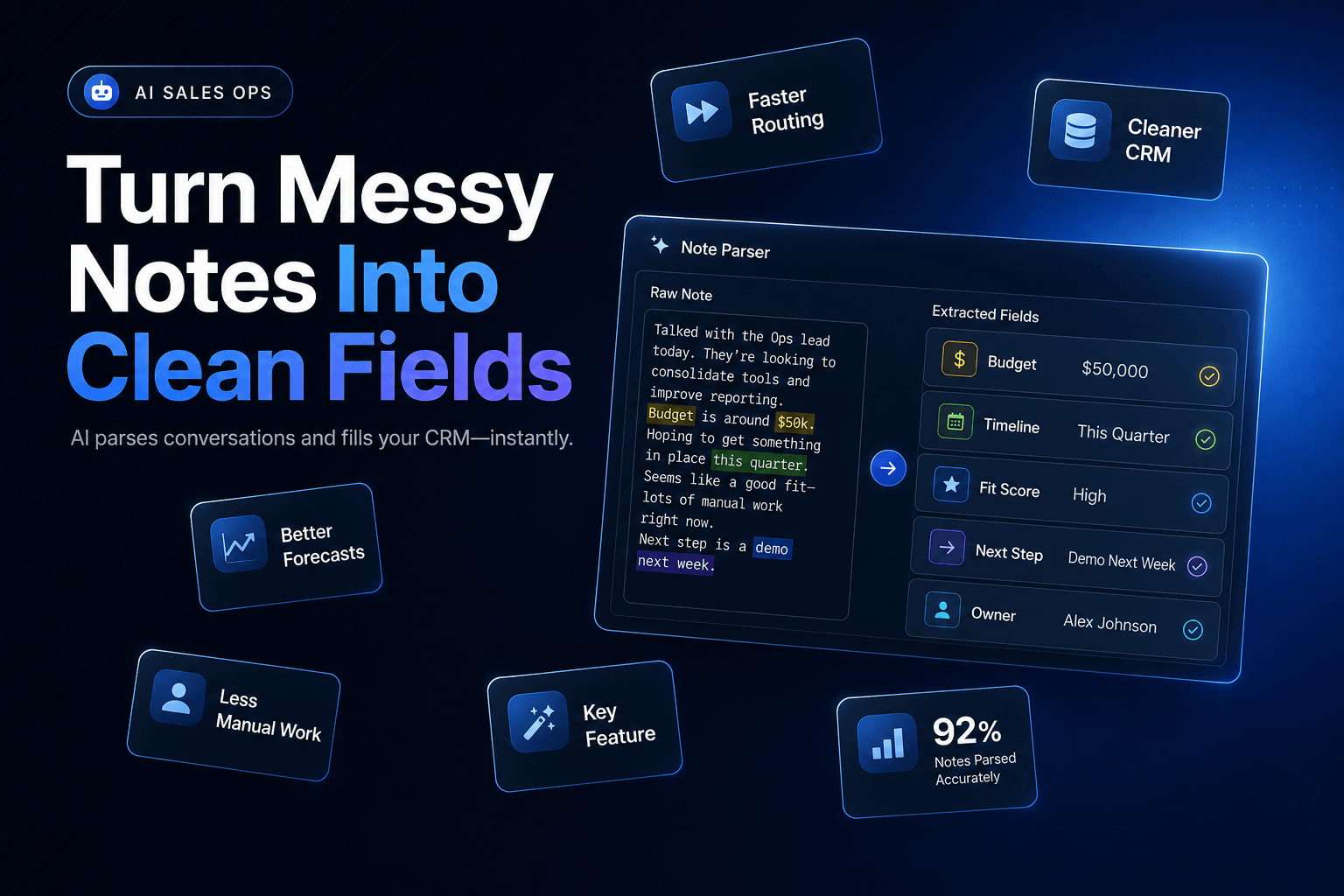
“Operations director is frustrated with missed weekend calls. They have two locations, use HubSpot, and want something live before the busy season. Owner needs to sign off.”
That one note contains at least six operationally important facts:
- Contact role: Operations Director
- Pain point: missed weekend calls
- Business footprint: two locations
- Existing system: HubSpot
- Timeline: before busy season
- Decision process: owner approval required
If those details remain buried in a paragraph, they cannot reliably trigger a routing rule, influence a pipeline report, or alert a rep to a short buying window. Humans can read the note. Systems cannot do much with it.
We have found that the best AI Automation workflows treat every note as an input that needs two outputs:
- A short human-readable recap for the next person touching the account.
- Structured fields that systems can filter, score, route, and measure.
That distinction matters. A summary tells someone what happened. Structured data tells the business what to do next.
For example, a service business may want its workflow to recognize “after-hours calls” as a Voice AI opportunity, assign the lead to an automation specialist, and create a task due within one business day. A SaaS company may instead need to capture competing tools, renewal date, team size, and security requirements.
Same note format. Very different action.
This is why turning notes into usable CRM data begins with operational questions, not a generic prompt asking AI to “extract key details.” Generic prompts produce generic records. Nobody needs more of those.
A summary field is where usable context goes to disappear
The fastest way to make AI extraction fail is to ask for everything.
When teams see a powerful model, they often request 25 fields, a polished account summary, objections, pain points, sentiment, buying intent, recommended messaging, lead score, and next steps. Then they wonder why half the records look invented.
Start with the fields that change a decision.
For an inbound sales workflow, that usually means a compact schema like this:
| Field | What it captures | Example |
|---|---|---|
| primary_use_case | The job the buyer wants solved | After-hours call handling |
| pain_point | The friction creating urgency | Missed calls on weekends |
| timeline | When action may happen | Before summer rush |
| decision_role | Contact’s role in purchase | Influencer |
| decision_process | Who else must approve | Owner approval required |
| current_tools | Relevant software or process | HubSpot, shared phone line |
| next_step | Concrete agreed action | Demo scheduled for May 14 |
| data_confidence | Reliability of extracted fields | High |
Notice what is missing: vague fields such as “good prospect” or “strong interest.” Those labels feel tidy but rarely survive a pipeline review.
A field earns its place when it affects one of four things:
- who owns the record
- what follow-up should say
- when the team should act
- how leadership measures pipeline health
This is where structured data makes AI automations more reliable. When timeline is a defined field instead of a sentence fragment, a workflow can flag leads with a 30-day buying window. When current_tools uses normalized values, RevOps can report on which platforms appear most often in won deals.
Do not force every nuance into a dropdown, though. Keep an evidence_excerpt field beside important extracted values. If AI marks the timeline as “Q3,” save the sentence that led to that conclusion.
That tiny design choice gives reps a way to check the work without reopening a 4,000-word transcript. It also makes debugging far less theatrical.
Extraction needs an evidence rule, not a smarter prompt
Most AI extraction mistakes happen because the workflow asks the model to infer facts it was never given.
A note saying “they are looking at options” does not prove active budget. “The founder will probably join the next call” does not prove a decision-maker has been engaged. AI can write those conclusions smoothly. Smoothly wrong is still wrong.
Build your extraction logic around evidence categories.
Input: call note, transcript, form response, or rep summary

1. Extract explicit facts stated by the buyer
2. Label reasonable inferences separately
3. Mark missing fields as "unknown"
4. Attach source excerpt to high-value fields
5. Send low-confidence or high-risk records to review
6. Write approved fields to the CRM
In practice, this means separating stated_pain_point from likely_use_case.
A buyer may say, “We lose leads when staff are out in the field.” That is an explicit pain point. Your workflow may infer that an AI voice receptionist could help, but it should store that as a recommendation, not as buyer-confirmed intent.
We also recommend defining field-level rules before prompt writing:
Use exact language for commitments
For budget_confirmed, accept only direct evidence such as “we have budget,” “this is approved,” or “we allocated funds.” Do not allow phrases like “interested” or “checking options” to qualify.
Preserve uncertainty
Use values such as unknown, not_discussed, and needs_review. Empty fields are ambiguous. A field marked not_discussed tells the next rep what to ask.
Normalize only after extraction
First capture “HubSpot Enterprise,” “Hubspot,” or “we use HS.” Then map each variant to HubSpot in a normalization step. Combining interpretation and cleanup in one prompt creates avoidable errors.
This approach also makes AI lead qualification scores that sales teams trust much easier to build. A score should rely on confirmed inputs where possible, not a model’s vague impression of enthusiasm.
Confidence scores should decide the next action, not pretend to measure truth
A confidence score is useful when it changes workflow behavior.
It is not useful when it becomes another mysterious number in the CRM that everyone ignores.
We usually frame confidence around source quality and evidence completeness, not the model’s internal certainty. A field extracted from a buyer’s direct quote, confirmed by a form submission, and matched to an existing CRM value deserves more trust than a field guessed from a rushed rep note.
Here is a practical operating model:
| Confidence band | Example | Workflow action |
|---|---|---|
| High | Buyer directly named budget, timeline, and next step | Update CRM and trigger follow-up |
| Medium | Timeline implied but no exact date stated | Update CRM, create rep verification task |
| Low | Contact role or company need is unclear | Save note, avoid scoring or routing changes |
| Conflict | Note contradicts CRM or prior call | Flag for human review before overwrite |
A 2025 Validity survey of 602 CRM users and administrators found that 76% said less than half of their CRM data was accurate and complete, while 37% reported losing revenue directly because of poor data quality. Validity’s State of CRM Data Management in 2025 That is why an AI workflow should not blindly overwrite records just because it found a new phrase in a call transcript.
Consider a real-world example. Your CRM says a prospect has 50 employees. A new note says, “We are a 12-person team.” Both could be technically true if one refers to the whole business and the other to a department.
The right action is not to pick a winner. Flag the conflict.
Confidence scoring should protect the CRM from false certainty, especially for fields that drive routing, lead qualification, compliance review, or executive reporting. Let AI handle the first pass. Let exceptions get attention.
The contrarian bit: automate the boring fields, not the story
Teams often overvalue AI-written call summaries because they look impressive in a demo.
The summary is rarely where the money is.
A beautiful recap does not prevent a hot lead from sitting unassigned. It does not update a competitor field. It does not tell an account executive that the buyer needs legal review before June 1. It definitely does not fix a five-year-old CRM record that has three duplicate contacts and a phone number from someone who left in 2022.
Gartner reported in July 2026 that 66% of sales leaders see low trust in AI-generated insights inside their organizations. Gartner’s research on building seller trust with proprietary data That skepticism is healthy when the system has no visible evidence, unclear rules, or a habit of making up tidy answers.
What actually works is less glamorous:
- Extract contact names, roles, tools, dates, objections, and next steps.
- Save proof snippets for consequential fields.
- Route exceptions to the right person.
- Keep the narrative summary short enough to read before a call.
We have seen teams lose adoption by pushing giant AI summaries into CRM activity feeds. Reps stop reading them after a week. Worse, the useful facts become harder to find because every record now contains a cheerful wall of text.
Paragraph soup has a cost.
Use the narrative layer for context that resists clean categorization: tone, political dynamics, unusual objections, or a comment that changes how the next conversation should feel. Keep it to five or six sentences. Everything else should become a field, a task, a tag, or a triggered workflow.
If your team needs help with the mechanics, CRM Automation for teams that hate manual data entry covers the broader system design behind reliable updates and handoffs.
Test 100 real notes before you let the workflow touch the whole pipeline
The first version of an extraction workflow should be treated like a new sales rep. Give it a manageable batch of real work, inspect the output, and correct its habits before expanding access.
Do not test on perfect notes. Use the chaotic material your team actually produces:
- transcripts with multiple speakers
- form submissions written at 11:47 p.m.
- notes with internal abbreviations
- records where buyer language conflicts with old CRM data
- incomplete follow-up summaries from busy reps
Pick 100 records and score the workflow against a simple review sheet. For each field, track:
- extraction accuracy
- percentage marked
unknowncorrectly - false positives
- overwrite conflicts
- time saved per record
- whether the output changed a real next action
That last metric is the one people skip. A system that extracts 95% of fields correctly but does not improve routing, personalization, or follow-up may be technically clever and commercially irrelevant.
HubSpot’s 2025 sales research found that 87% of salespeople said AI helped them use their CRM tools more. HubSpot’s 2025 Sales Trends Report analysis More CRM activity only helps if the right information lands in the right place.
After the initial review, refine one field at a time. Tighten evidence requirements for budget_confirmed. Add a controlled list for current_tools. Reduce the summary length. Change the escalation threshold for conflicts.
Small adjustments compound quickly. A workflow that gets 10 fields right consistently beats one that promises 40 and leaves RevOps cleaning up after it.
Your CRM should become easier to trust with every processed note, not busier.
Build a CRM your sales team can actually use
Turning messy lead notes into usable CRM data is practical AI work. It removes copy-paste labor, gives reps a clearer starting point, and gives RevOps fields that can drive routing, reporting, and follow-up without detective work.
The hard part is not the model. It is deciding what counts as evidence, which fields matter, and when the workflow should raise its hand instead of guessing.
Start with one high-volume note source. Create a lean schema. Store evidence beside important fields. Make confidence levels trigger different actions. Then measure whether the result helps someone respond better or move a deal forward.
AI-Automated builds AI Agents and Workflow Automation systems that turn messy sales activity into usable CRM data, timely tasks, and faster follow-up. Schedule a free consultation to map the lead-data bottlenecks slowing your team down and build a workflow that fixes them.